Activity productivity rates
Using the Smart Planning feature in Iris allows schedulers to establish productivity factors for activities and then scale durations accordingly. These rates also help with generating a bottom-up cost for the project.
Set the productivity factors
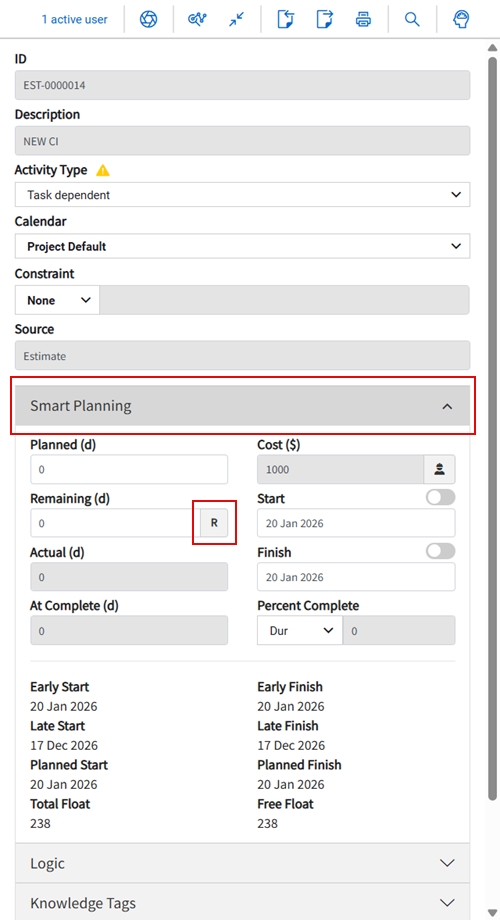
- In Plan view, select an activity from the list, and then click Smart Planning in the Iris panel..
-
In the Remaining (d) field, click the R icon to open the Set Productivity Rate dialog box.
-
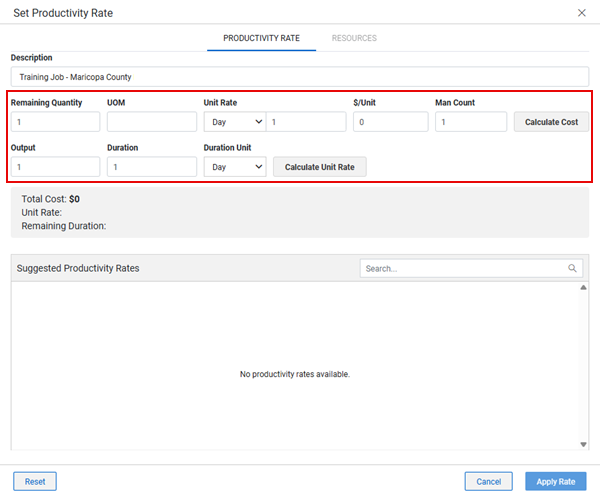
Enter values in the Cost and Unit Rate calculators on the Productivity Rate tab to determine productivity cost and unit rate.
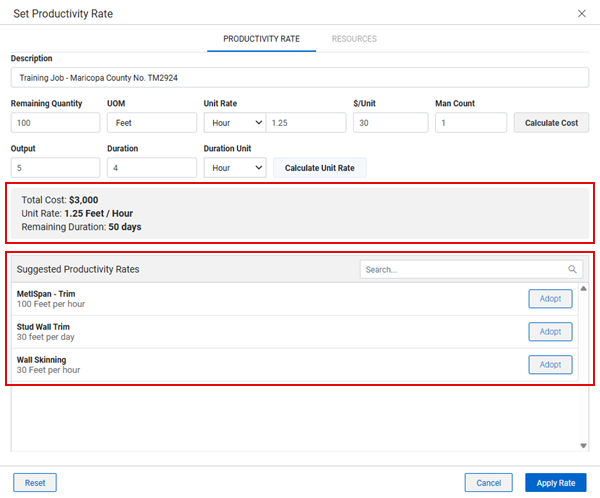
As you enter values in the calculator fields, the Knowledge Base pulls in suggested productivity rates based on past packages that are similar in their descriptions, associated knowledge tags, and benchmark selection.
-
You can do the following:
-
Manually fill in the calculator fields with values.
-
Click Adopt to select a suggestion, this automatically fills in the calculator fields with the values from the Knowledge Library.
You can continue to adjust the rate for the current project even after adopting a suggestion.
-
Click the Calculate Cost and Calculate Unit Rate buttons to show in the calculation summary.
Review the summary to see how the changes impact the activity duration and cost.
-
Click Apply Rate to accept the productivity rate.
You can view the project’s bottom-up and top-down costs. In the top toolbar, click Select an Annotation, and then select Cost from the drop-down list.